Tuesday, December 13, 2011

FileWall : An encryption file system-based software

FileWall is a lightweight transparent encryption file system-based software. Integrated in the Explorer context menu.The final effect is similar to NTFS using the built-in file encryption, but FileWall not so tight fit in the system, dependent on NTFS.FileWall can be used in all of the above Windows 2000 operating system, and supports any file system known theoretically unknown file systems are supported.


On the security side, FileWall using AES-128 as the default encryption algorithm, encryption of the data block. Data encryption, unless someone can get the password, or by any means are unable to obtain the original data. So please save your password.

Download FileWall from Here

Source: hummerstudio.com

Hey! My friends, If you like my post you can save it using "Save Page as PDF" button below and you can even share them to your friends with social networking buttons provided below this post.

Add To Google BookmarksStumble ThisFav This With TechnoratiAdd To Del.icio.usDigg ThisAdd To RedditTwit ThisAdd To FacebookAdd To Yahoo

Tuesday, December 6, 2011

GSview : A Tool To Convert PS Files to PDF Files.

GSview is a graphical interface for Ghostscript. Ghostscript is an interpreter for the PostScript page description language used by laser printers. For documents following the Adobe PostScript Document Structuring Conventions, GSview allows selected pages to be viewed or printed. GSview requires Ghostscript. GSview is available for Windows, OS/2 and Linux.

GSview was written by Russell Lang at Ghostgum Software Pty Ltd. Ghostscript was originally written by Aladdin Enterprises and is now maintained by Artifex Software, Inc.

How to convert PS to PDF?
1. Open a PS Viewer / Browser (Here, we take GSView as an example)

2. Open a PS (Post Script) document

3. Select from main menu "File"->"Print"

4. Select Printer "Virtual PDF Printer"

5. If you need to adjust PDF generation options, click the "Property" button on the right

6. Click "OK"

7. A dialog will pop up, assign the folder and file name of the PDF document to be generated


8. Congratulations! You have converted PS to PDF document now.

If you are using Windows 7, please try GSview 4.91 beta.

Requires: Ghostscript

Download GSview from Here

Source: pages.cs.wisc.edu

Hey! My friends, If you like my post you can save it using "Save Page as PDF" button below and you can even share them to your friends with social networking buttons provided below this post.

Add To Google BookmarksStumble ThisFav This With TechnoratiAdd To Del.icio.usDigg ThisAdd To RedditTwit ThisAdd To FacebookAdd To Yahoo

Sunday, November 27, 2011

Notepad 7 – A Text Editor with MS Office 2010 Look

Notepad7 is a text editor, like Microsoft Notepad, with MS Office 2010 Look and Feel. The Office 2010 style ribbon interface gives instant access to text editing features.


Using Notepad7 is so simple, just type on textbox and save with default extension '.txt'. If you want to open '.txt' file with notepad7, just change 'Opens with' application property. To do that, right click on the text document and choose properties. Click on 'Change' button of opens with application and browse '%PROGRAMFILES%/Notepad/Notepad7.exe'.

Notepad-7 will run only on the following systems:
  • Microsoft Windows Vista Service Pack 2
  • Microsoft Windows 7
  • Microsoft .Net Framework 4.0

Download Notepad 7 from Here

Source: skyforu.info

Hey! My friends, If you like my post you can save it using "Save Page as PDF" button below and you can even share them to your friends with social networking buttons provided below this post.

Add To Google BookmarksStumble ThisFav This With TechnoratiAdd To Del.icio.usDigg ThisAdd To RedditTwit ThisAdd To FacebookAdd To Yahoo

Friday, November 25, 2011

ePub to Mobi : A Tool That Converts eBooks from .epub to .mobi Format

Both EPUB and MOBI are very popular e-book format. The EPUB is a free open standard, one EPUB file internal use XHTML or DTBook (a by DAISY Consortium's XML standard) to show the text. And the Amazon Kindle has been very popular today, the Kindle use the MOBI format, so if you are a Kindle user and have a lot of EPUB books, you should need this small software. And, at the best, this software is a completely free and simple.


Currently, several software can convert *.epub files to *.mobi files, such as Amazon's kindlegen, but its command line is inconvenient for non-professionals or beginners,. This program is based on kindlegen, can help the normal users can more easily to complete the file conversion by themselves, moreover it provides more formatting and conerting jobs.


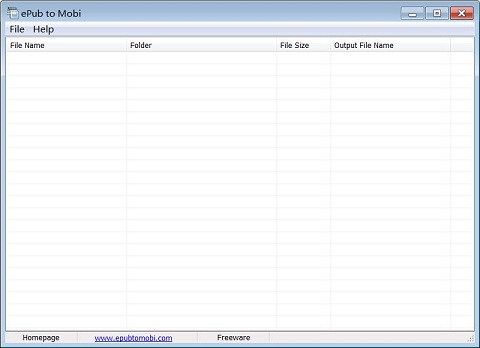
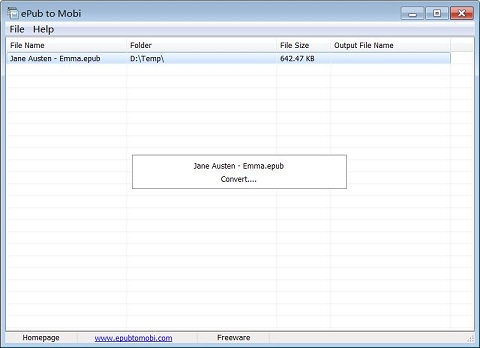
ePub to Mobi is a free software that can convert the *.epub e-books to *.mobi e-books. It supports batch conversion, you can one time convert many files. This software will automatically extract the original contents of each EPUB file, then analysis, format and convert these files. The conversion process is very fast.

After running the software, press the hotkey "Ctrl + O" to select the *.epub files you want to convert, then press "Cltr + E" to start the conversion, you need to specify an output folder, the resulting *.mobi files will are stored in the output folder.

Download ePub to Mobi from Here

Source: epubtomobi.com

Hey! My friends, If you like my post you can save it using "Save Page as PDF" button below and you can even share them to your friends with social networking buttons provided below this post.

Add To Google BookmarksStumble ThisFav This With TechnoratiAdd To Del.icio.usDigg ThisAdd To RedditTwit ThisAdd To FacebookAdd To Yahoo