Monday, August 8, 2011

StartUpLite : A Tool That Speeds Windows' startup

StartUpLite allows novice computer users to speed up their computer`s load time by disabling or removing unnecessary startup entries safely and effectively. The program scans for a few dozen programs that are found on many computers but are commonly deemed unnecessary and can be safely disabled to speed up the load time of your computer. StartUpLite does not delete any programs, it only disables their auto-startup registration, which can be undone later if needed. Some of the programs it scans for include Adobe Gamma Loader, IgfxTray, TkBellExe, SunJavaUpdateSched, QuickTime Task and many others. StartUpLite also provides a short description for each item to help you decide which ones you want to disable or remove.

This useful executable helps identify and disable unnecessary start-up programs. StartUpLite's simple single window interface contains all the information needed to operate the applications.

Just run it and StartUpLite lists start-up programs it deems unnecessary. A short description is given for each item. Select programs also rate a short explanation describing how disabling the app would affect the system. Each listed program has three check box options to Disable, Remove, or perform No Action. Simply click to choose for each and press a single button to continue. The program removes or disables checked entries and recommends a system reboot.

StartUpLite doesn't offer a method to restore disabled programs, but presents a link to open Msconfig to perform the function. Less-experienced users should find this app helpful in uncovering unneeded start-up programs.

Download StartUpLite from Here

Source: malwarebytes.org

Hey! My friends, If you like my post you can save it using "Save Page as PDF" button below and you can even share them to your friends with social networking buttons provided below this post.

Add To Google BookmarksStumble ThisFav This With TechnoratiAdd To Del.icio.usDigg ThisAdd To RedditTwit ThisAdd To FacebookAdd To Yahoo

Sunday, August 7, 2011

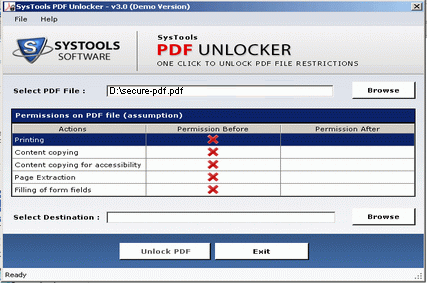
SysTools PDF Unlocker : The Best PDF Restriction Remover Tool

Are you searching for some genuine and highly advanced PDF Unlocker tool so that it would be easy for you to unlock PDF restrictions from your locked Adobe Acrobat PDF files. Once restrictions are removed performing operations like (editing, printing, copying, extractions) thus becomes possible. You are trying your hand for some PDF Unlocker commercial package which makes it possible for you to remove “Owner” password from PDF file. 

SysTools PDF Unlocker software is an easy-to-use and thus one of the best PDF restriction remover tools that you can easily use to unlock PDF files.


PDF Unlocker is a shareware, however you can either try the demo version (not that impressive as leaves a watermark) or search for the free versions available. The tool is great for people who are very much interested in buying it.

Download SysTools PDF Unlocker from Here

Source: pdf-unlocker.com

Hey! My friends, If you like my post you can save it using "Save Page as PDF" button below and you can even share them to your friends with social networking buttons provided below this post.

Add To Google BookmarksStumble ThisFav This With TechnoratiAdd To Del.icio.usDigg ThisAdd To RedditTwit ThisAdd To FacebookAdd To Yahoo

Friday, August 5, 2011

EASEUS Partition Master : A Partition Software for USB hard drive Partition

Although there are lots of partition tools in the market, most of them are charged. Few partition tools are really free for USB hard drive partition.

To optimize the performance of your USB hard drive, a third party application is needed. EaseUS Partition Master Home Edition, a freeware to manage partition, works as a powerful and magic partition software. With this partition freeware, you could enjoy a wonderful experience of managing your partition like a magic, such as Resizing, Copying, Creating, Deleting partitions and so on. Especially you can enjoy extend NTFS system partition without reboot and Dynamic Disk Copy.

This partition freeware works perfectly with hardware RAID and Windows 2000/XP/Vista/Windows 7 32/64 bit Operating Systems. Moreover, with user-friendly interface, you can partition your USB hard drive with very simple operations. So no matter you are a computer expert or not you can perform USB hard drive partition easily. The most shining point of this freeware is that your data is completely protected during the process of partitioning your USB hard drive.


How to Partition USB Hard Disk with this Partition Freeware?

1. Launch EaseUS Partition Master.

2. Select the hard disk partition to be resized and click Partitions > Resize/Move partition.

3. On the disk map, current size of the partition is displayed on the top of the dialog box. The map also depicts the used and unused space within the partition and the free space surrounding the partition (if any exists). The minimum and maximum sizes that you can resize a partition appear below the map.

4. Position the mouse pointer on the left or right partition handle.

5. The mouse pointer changes to a double-headed arrow.

6. Drag the handle to the partition size you want.

7. Click OK.

Download EASEUS Partition Master from Here

Source: partition-tool.com

Hey! My friends, If you like my post you can save it using "Save Page as PDF" button below and you can even share them to your friends with social networking buttons provided below this post.

Add To Google BookmarksStumble ThisFav This With TechnoratiAdd To Del.icio.usDigg ThisAdd To RedditTwit ThisAdd To FacebookAdd To Yahoo

Thursday, August 4, 2011

calibre : Converts your e-books from one format to another


calibre is free and open source e-book computer software that organizes, saves and manages e-books, supporting a variety of formats. It also supports e-book syncing with a variety of popular e-book readers.

calibre is cross-platform (programmed in Python and C) and is intended for the three main operating systems, Linux, Mac OS X and Windows. calibre was originally called libprs500, but was renamed calibre (lower case 'C') in mid-2008.
calibre supports the conversion of many input formats to many output formats. It can convert any of the following input formats to any of the output formats.

Input Formats: CBZ, CBR, CBC, CHM, EPUB, FB2, HTML, LIT, LRF, MOBI, ODT, PDB, PDF, PML, PRC^, RB, RTF, TCR, TXT
Output Formats: EPUB, FB2, LIT, LRF, MOBI, OEB, PDB, PDF, PML, RB, RTF, TCR, TXT.

calibre is primarily an e-book cataloging program. It is designed around the concept of the logical book, where a single database entry corresponds with the same book in a variety of formats. calibre supports the following formats for cataloging: AZW, AZW1, CBR, CBZ, CHM, EPUB, FB2, HTML, IMP, LIT, LRF, LRX, MOBI, ODT, OEBZIP, OPF, PDB, PDF, PML, PMLZ, PRC, RAR, RB, RTF, SNB, TPZ, TXT and ZIP.

Download calibre from here

Source: calibre-ebook.com

Hey! My friends, If you like my post you can save it using "Save Page as PDF" button below and you can even share them to your friends with social networking buttons provided below this post.

Add To Google BookmarksStumble ThisFav This With TechnoratiAdd To Del.icio.usDigg ThisAdd To RedditTwit ThisAdd To FacebookAdd To Yahoo