Showing posts with label Technology Updates. Show all posts

Friday, July 24, 2015

Google Books Downloader 2.5 : A Utility Tool for Downloading a Sample or Preview from Google Books Search

Google is one of the best sources of downloadable books on the Internet, allowing you to choose what you want to read from various sources and access them on your computer or on an E-reader. Google Books has always helped users discover and read out-of-copyright books online. 

You can notice that there are two forms of Google Books: 
(1) Google Books search engine, online reader
(2) Google Play Books store. 

Here I would be talking about a utility tool named "Google Books Downloader" for Downloading a sample or preview from Google Books Search.

Google Book Search is a tool from Google that searches the full text of books that Google scans, converts to text using optical character recognition, and stores in its digital database. Many popular books are available with Google Book. The books available can be read online only and cannot be downloaded for later use. You can download certain books as png that allows public-domain works and are free from copyright protection. Only few books are available with full preview based on agreements with publishers. 

Google Books Downloader 2.5 is a Light-weight, Freeware utility that lets out download any book that's available in "full view" from Google Books. Of course, most of these books also feature download links right on the web page, but Google Books Downloader lets you queue up multiple jobs and convert all of the downloaded books to PNG, JPEG, and PDF files with various resolutions as the option (Starting from 350 px to 1280 px).

The application allows you to print the entire book or specific parts such as illustrations and paragraphs. You can also easily extract quotes from the book. This small piece of software will only allow you to download books with "Full view" or "Preview" status. Basically the number of pages you can view/preview on the Google Books website is the number of pages/photos you are allowed to download on your computer. If the user chooses to download and save the book as .jpeg or .png files, every page in that book will be saved as a different photo on your computer.

The user is able to choose the file format of the downloaded book, the destination folder and the resolution, which is very important when you are saving the book as a series of images. The resolution will define the quality and clarity of your files.


HOW TO DOWNLOAD GOOGLE BOOKS?

Step 1: Download and install the Google Books Downloader from Here . Now open the application after installation. Here is the preview of the software.


Step 2:  In the Google search, find for your desired book that need to be previewed and download. 


Step 3:  Click the desired book to preview it before downloading. You can see the book contents (Not all the pages in many of the books). Now you are ready to go for a download.


Step 4:  Copy the URL for the book you want to download. Open the preview in the Google Books search reader and then copy the URL. 


Note: This tool will only download the pages that you can view in the Google Books website reader.


Step 5: Paste the URL into the "Google Book URL" box in Google Book Downloader. 


Step 6: Select your output format (PDF, JPEG or PNG). 


You can also select the resolution of your choice from the provided options. 


Also there is an option where you want the book to be saved which can be set for the output folder. By default, it will be saved to your desktop.


Step 7: Click the "Start" button to begin downloading the book. This may take a little while if there are a lot of pages. 


Step 8:  Click on OK button after the download is complete.


Note: The contents can be found on the path you have selected as an output folder.


Supports:
The application is available for Windows and requires Microsoft .NET Framework 3.5 SP1

Source: support.google.com and www.gbooksdownloader.com

Download Google Books Downloader 2.5 from Here

Add To Google BookmarksStumble ThisFav This With TechnoratiAdd To Del.icio.usDigg ThisAdd To RedditTwit ThisAdd To FacebookAdd To Yahoo

Sunday, March 22, 2015

Microsoft OneDrive and Microsoft SkyDrive: What's the Fuss?

Microsoft OneDrive vs SkyDrive


Microsoft OneDrive and SkyDrive refers to the same cloud storage service (online storage service) provided by Microsoft and, in fact, there is no difference between them in the service they provide. It’s only a name change. Initially, Microsoft’s cloud storage service was called SkyDrive but later, due to a lawsuit that arose due to using of word “sky,” which breached the trademark of British Sky Broadcasting Group (BSkyB), Microsoft had to rebrand the service as OneDrive. So OneDrive is the latest name given to the former name SkyDrive. Now the name SkyDrive is no longer being used.


Microsoft SkyDrive:


In 2007, Microsoft introduced its cloud storage service under the name “Windows Live Folders” where it is an online storage space that the users who created an account got several Gigabytes of space. 

Later, by the end of August 2007, the name was changed to SkyDrive and continued that name until the name was changed as OneDrive in 2014. To get a SkyDrive, account users should create a Microsoft Live account. 

Initially, some free spaces of about 7 GB was provided (Currently users get 15 GB). If extra space is needed, they can be obtained by paying. To upload and download files, a web interface has been provided and it is supported by all major browsers such as Internet Explorer, Firefox and Google Chrome. Apart from the browser interface, client applications exist for various operating systems such as Windows, Windows Phone, iOS, Mac OSX, and Android where they allow synchronization of files in the local SkyDrive Folder with the online SkyDrive storage. 

From Windows 8, Microsoft introduced SkyDrive features into the operating system itself where a metro application came inbuilt into the distribution and also latest Office products such as Office 2013 can work directly on the SkyDrive. In addition, SkyDrive is linked with Office Web applications where users can create office documents in the SkyDrive and, on the fly, use them directly from the web browser itself. 

Apart from the normal SkyDrive, an enterprise service called SkyDrive Pro exists where that gives larger storage capacities integrated with more advanced features for business users. Users get several options to do with the files. One is, they can keep their files private. Another option is that they can share the file with others using a link. The next option is one can make a file publicly appear on web. Users can select whether a file is read-only to others users or whether it is editable.


Microsoft OneDrive:

Microsoft OneDrive (previously SkyDrive, Windows Live SkyDrive and Windows Live Folders) is a file hosting service that allows users to upload and sync files to a cloud storage and then access them from a web browser or their local device.

The concept behind the name OneDrive is spelled out pretty clearly by the refreshed service’s tagline: one place for everything in your life. “One place for all of your photos and videos. One place for all of your documents,” Microsoft said in its first OneDrive blog post. “One place that is seamlessly connected across all the devices you use.”

It is the latest name given for SkyDrive where the name change happened in February 2014. In 2013, British Sky Broadcasting Group (BSkyB), which is a British telecommunications company, filed a lawsuit against Microsoft for using the word “sky. ” After high court decided that Microsoft breached the trademark of Sky Broadcasting Corporation by using word “sky,” Microsoft settled down the case by deciding to drop the name. Then they named their service (rebranded) as OneDrive where SkyDrive became OneDrive and SkyDrive Pro became OneDrive for Business. Only the name was changed and there was no change to services or features. 

OneDrive is Microsoft's competition to Google Drive and Apple's iCloud, attempting to be the place where customers can manage their files on the cloud from anywhere. The name change to OneDrive from SkyDrive doesn't change the overall meaning of what Microsoft is pursuing in the cloud: your one stop shop for file access - old name or new name.

OneDrive is free, personal online storage that you can choose to use at home, work, or school. Your files are available from any device by going to the OneDrive website or using the OneDrive mobile app for your phone. 

Now nearly a year has passed since the name change and Microsoft added and modified features during this time. Currently, OneDrive provides the service of 15 GB of free storage for new users.. Office 365 users would get unlimited storage. The current web interface is a cleanly built interface using latest HTML 5.

The main difference between Microsoft OneDrive and SkyDrive:
  • Microsoft SkyDrive is a storage service introduced by Microsoft in 2007. In 2014, the name of the service was changed due to a lawsuit and the new name is OneDrive.
  • OneDrive is improving on SkyDrive, there's really no bad way to spin it. If you were a SkyDrive user in the past, you probably won't mind the rebranding and new features.

Finally!
The cloud storage service started by Microsoft in 2007 had the name “SkyDrive” but, in 2013, after a lawsuit filed by British Sky Broadcasting Company regarding the usage of word “Sky,” Microsoft had to drop the name SkyDrive. Then, in 2014, they re-branded the service under the name OneDrive. Hence, SkyDrive and OneDrive refers to the same service but the current name is OneDrive.

Article and Image Source: OneDrive and SkyDrive logos via Wikipedia

Add To Google BookmarksStumble ThisFav This With TechnoratiAdd To Del.icio.usDigg ThisAdd To RedditTwit ThisAdd To FacebookAdd To Yahoo

Wednesday, December 3, 2014

Able2Extract PDF Converter 9 : A Complete PDF Conversion Package

Everyone knows that a PDF file can be created using PDF writers, such as Adobe Acrobat. But, many of us sometime need a tool that helps convert our PDF file to other forms such as Word Document, PowerPoint Slide, Excel Sheet, Various Image Formats, HTML file, and many other file forms.

Do there exists a single package that fulfills our need? The answer is a big "YES". Of course there is one of the best application out there that you seek for your work and it is Able2Extract PDF Converter 9.
Logo of Able2Extract PDF Converter 9

Investintech.com Inc., a Canadian company is one of the pioneer developer in the proprietary PDF technology. Hundreds of thousands of people worldwide are using their flagship PDF product Able2Extract. I am one of them. What I love about this application is that is simple, yet strong and efficient conversion tool that saves my time and increases the productivity.


Able2Extract allows users to effortlessly convert PDF documents into formatted Excel, Word, PowerPoint and more, including the popular AutoCAD design format. Be it Windows, Mac or Linux, it runs effectively. This could even be used in Desktop as well as Server machines. The choice is yours.

Last time I reviewed about Able2Extract PDF Converter 8 in my post HERE. Now, I would be reviewing it for Able2Extract PDF Converter 9 which is just released today (i.e. December 3, 2014). 
Boxshot of Able2Extract PDF Converter 9

Why to Choose Able2Extract 9? 
  1. With a revamped and modernized GUI this application has become more and more better in its functionality.
  2. It is easy to edit a PDF file instead of using online PDF converter.
  3. It provides high quality conversion facility with editable facility.
  4. It has options to convert PDF to popular Microsoft Office files such as formatted MS Excel spreadsheets, editable MS Word documents, Publisher files, and PowerPoint presentations.
  5. It allows conversion of PDF to non-Microsoft formats like AutoCAD (DWG, DXF), Open Office, image formats (jpeg, bmp, png, tiff, etc.), HTML, Text files, and more.


These are only some of the highlighted features of this software.

It have several new features on this upgraded version that will make for an all-around complete PDF conversion package. Some of them are: extensive PDF creation capabilities (creating regular and secure PDFs, printing PDF without opening the file), editing features (delete, resize, move, scale, rotate, adjust viewing preferences), enhanced PDF to Excel customization, and many more....

Okay let's explore the tool.


User Friendly and Attractive Interface:
The Able2Extract interface is user-friendly and simple to navigate. It's look is even better than the previous version. See here below:

Main Window of Able2Extract 9

Main Window with an opened PDF File in Able2Extract 9

Many Conversion Options:
Able2Extract 9 is a famous PDF to Excel conversion tool as it lets users take tabular data from their native and scanned PDF documents and then convert it into perfectly formatted Excel spreadsheets where they can perform their own analysis.

It preserves the layout, formatting, and graphics of the PDF within MS Word. Conversions retain the look and feel of even the most complex PDF documents. Conversion output options a both .doc or .docx format.  

With Able2Exract 9, you can take PDF data and move it into PowerPoint (.PPT, .PPTX) format for easy editing and viewing in your presentation. 

Make edits in desktop publishing by just taking PDF content and making it available for editing and revision in Microsoft Office Publisher.

Open Office is increasingly seen as the alternative to Microsoft Office. Able2Extract 9 supports conversions from PDF to Writer (Word equivalent), Calc (Excel equivalent) and Impress (Powerpoint equivalent).

This application maintains the contents of the PDF files when converted into HTML files, including Fonts, Tables, Graphics, etc. The result is more accurate and stay truer to the actual PDF document once it is converted back into its native form.

It converts PDF to DXF and DWG, the file formats supported by Autocad. Using this conversion feature, users can recover vector graphics and text from the PDF and place it into Autocad readable formats. 

You can even convert the entire PDF file to a simple plain text.

It can convert PDF Images into popular image formats such as TIFF, JPEG, PNG, BMP, and GIF. User has the ability to designate image dpi, color or black and white and more. 

The File menu provides user with various conversion options to transform the files.

I would not be talking on these conversions techniques as these have been talked earlier in my blog post (February 5, 2014) and are similar to the previous version (i.e. Able2Extract 8). You can go through my article HERE.

So, What are the features in New Version?
This time the developers have added some extra features in this upgraded version of Able2Extract that makes this tool even more efficient.

Pages: Delete, Resize, Move, Scale, and Rotate
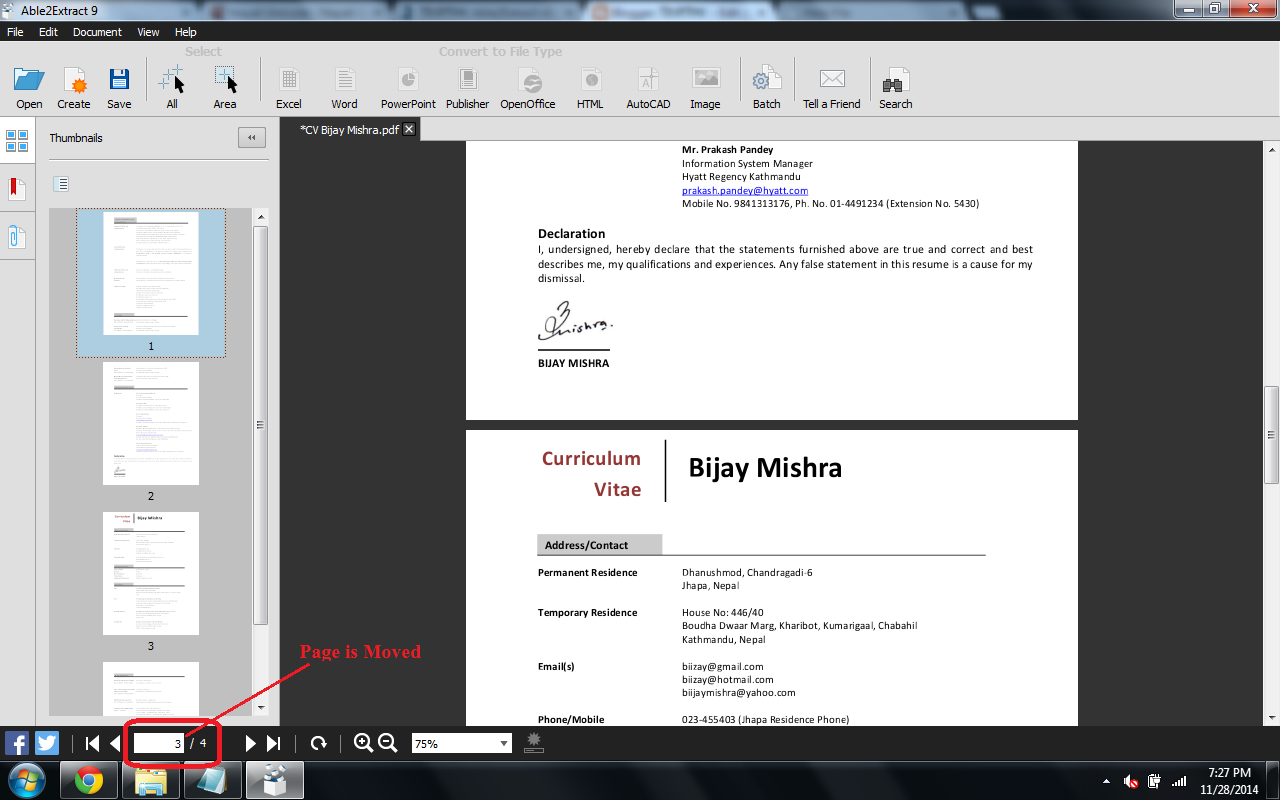
On the Edit Menu a new feature called "Pages" is added. The PDF pages can be deleted, resized, moved, scaled and rotated according to the user needs. Some screenshot are shown below for these option.

"Resize Pages" Option

Result of "Resize Pages"

"Move Pages" Option

Result of "Move Pages" 

"Rotate Pages" Option

Result of "Rotate Pages"

"Scale Pages" Option

Result of "Scale Pages"

Viewer Preferences
It helps to specify how your PDF document will be displayed when opened by recipients with a standard PDF viewing application.

Example 1: Page Mode with Thumbnail Panel. This creates the PDF file with the thumbnails in the left Panel as shown in the image below:


"Page Mode" with "Thumbnail Panel" Option

"Thumbnailed" PDF File

Example 2: Page Layout with Two columns, First Page on Left. This creates the PDF file with the thumbnails in the left Panel as shown in the image below:


"Page Layout" with "Two Columns, First Page on Left" Option 

Result of  "Two Columns, First Page on Left"

PDF Creation Option
The Security tab allows users to specify the level of security for the PDF files being created. Checking the Secure PDF box will give users options to apply a User or Owner password. Applying an Owner password enables users to add file permissions that can either restrict or allow users to print, copy content, modify the document and add comments.

Security Tab

Compatible Operating Systems:
Able2Extract 9 is released today i.e. December 3, 2014 and is one of the application’s most significant upgrades to date. This is a cross-platform compatible version that runs on both Mac and Linux operating systems in addition to Windows.
  1. Windows 8.1, Windows 8, Windows 7, Windows Vista, XP SP3/2003 SP3/Vista SP2/7/2008/8 or newer, x32 or x64 edition
  2. Mac OS X 10.5.8 (Leopard)/10.6.1 (Snow Leopard)/10.7 (Lion)/10.8 (Mountain Lion) or newer, x32 or x64 editions
  3. Fedora 15 or newer, Ubuntu 10.04, 11.04 or newer, x32 or x64 editions


I have given my try .... You guys can also have a try by downloading from the link given below. 

Download Able2Extract 9 from Here

Test the Application with a Free Trial 

Able2Extract can be downloaded for seven-day free trial from the Investintech Website. The software is available for professional and personal use. In addition to a 7 day free trial, Able2Extract is also available for single, volume, and subscription licensing. (I have my subscribed licensed version. You too can purchase it.).


A licensed Version

Buy it. You would not regret in your decision for purchasing it.

Source: http://www.investintech.com/ 

The author of this Blog can be interacted on Twitter. You can follow him at this Handle

Add To Google BookmarksStumble ThisFav This With TechnoratiAdd To Del.icio.usDigg ThisAdd To RedditTwit ThisAdd To FacebookAdd To Yahoo

Monday, June 20, 2011

Evolution and Future Of Apple Products.

It seems like Steve Jobs is thinking big now-a-days. A few years back, the release of iPhone was a great success and till now no other phone has killed it. Then, recently iPad came into being which seems nothing but a bigger version of iPod but still it has made a success in the market right from the beginning. So, the bigger the better?


Now the question is what’s next? As mentioned earlier, Steve jobs is thinking big. So, here is a clue to what we will have out of Apple in next 4 or 5 years. On the eve of 2012, Apple will produce an iBoard which will be as big as your standard 15 inch LCD monitor. I hope world wouldn't end late that year and in case it survives, Apple will release an iMat in 2014 which could be something you will use at your drawing room as an alternative to carpet; instead it will be more digital of course. What remains at Apple disposal is an idea to roll out an iPort supporting plane landings in a digital fashion. Surely, we are moving towards an all Apple era making our life digital. Wasn't life simple when Apple and Blackberry were just fruit?

Source: techskipper.com

Hey! My friends, If you like my post you can save it using "Save Page as PDF" button below and you can even share them to your friends with social networking buttons provided below this post.

Add To Google BookmarksStumble ThisFav This With TechnoratiAdd To Del.icio.usDigg ThisAdd To RedditTwit ThisAdd To FacebookAdd To Yahoo

Thursday, May 19, 2011

Microsoft Office 2010 SP1 To Be Release By June 2011

Microsoft said on Wednesday that the company is planning a Service Pack 1 for Office 2010 by the end of 2011.

In a company blog, Director of Microsoft Office Managed, Quin Nikel said the software giant plans to offer a final version of Office 2010 SP1 by the end of 2011. Citing Microsoft’s recent Windows 7 SP1 announcement, Nikel said “some of you may be wondering when the Office 2010 and SharePoint 2010 SP1 will be available for download. Microsoft typically releases a service pack 12 to 18 months after a product is launched and you can expect that same timeframe for Office 2010 and SharePoint 2010.”

Microsoft’s upcoming Office 2010 and SharePoint 2010 SP1 will consist of minor updates, including all previously released public updates according to the software maker. “For customers that stay current, there’s no need to wait for SP1 to deploy. You are already enjoying the advantages of SP1 and can deploy now knowing that you will benefit from all the innovations included in Office 2010 and SharePoint 2010″ said Niel.

The changes can be made in following aspects: 
  • Fixes an issue in Outlook where “Snooze Time” would not reset between appointments.
  • The default behavior for PowerPoint “Use Presenter View” option changed to display the slide show on the secondary monitor.
  • Integrated community content in the Access Application Part Gallery.
  • Better alignment between Project Server and SharePoint Server browser support.
  • Improved backup and restore functionality for SharePoint Server.
  • The Word Web Application extends printing support to “Edit Mode.”
  • Project Professional now synchronizes scheduled tasks with SharePoint task lists.
  • Internet Explorer 9 to provide “Native” support for Office Web Applications and SharePoint.
  • Office Web Applications support for Chrome.
  • Inserting Charts into Excel Workbooks using Excel Web Application.
  • Support for searching PPSX files in Search Server.
  • Fixes scaling issues and arrowhead rendering errors in Visio with SVG export.
  • Proofing Tools improve spelling suggestions in Canadian English, French, Swedish and European Portuguese.
  • Outlook Web Application Attachment Preview (with Exchange Online only).
  • Ability to uninstall the service pack for Office client suites using “Add Remove Programs” Control Panel.
For detail news visit Here

Hey! My friends, If you like my post you can save it using "Save Page as PDF" button below and you can even share them to your friends with social networking buttons provided below this post.

Add To Google BookmarksStumble ThisFav This With TechnoratiAdd To Del.icio.usDigg ThisAdd To RedditTwit ThisAdd To FacebookAdd To Yahoo

Sunday, November 22, 2009

Windows Home Server Power Pack 3 coming November 24


Microsoft has announced that Windows Home Server (WHS) Power Pack 3 (PP3) will be available in all shipping languages (Chinese, English, French, German, Italian, Japanese, and Spanish) on November 24, 2009. As always, PP3 will arrive for free via Windows Update for all existing Windows Home Server users.

PP3 adds features like backup and restore of computers running Windows 7, Windows 7 Libraries integration, enhancements for Windows Media Center, and better support for netbook computers. Microsoft is reminding Windows 7 users to be sure to install PP3 to get the "most optimal experience" on a WHS network.

Microsoft released a single beta of PP3 in July 2009 and said there would be no further betas or Release Candidates. The plan was to get PP3 out by the fourth week of October, but delays set the release back by about a month.

WHS PP2 arrived in March 2009 and PP1 arrived in July 2008. In addition to PP3, Microsoft is reportedly working on version 2 of WHS, though details on that release are still scarce.

Add To Google BookmarksStumble ThisFav This With TechnoratiAdd To Del.icio.usDigg ThisAdd To RedditTwit ThisAdd To FacebookAdd To Yahoo

Saturday, August 8, 2009

BandWidth Explained

Most hosting companies offer a variety of bandwidth options in their plans. So exactly what is bandwidth as it relates to web hosting? Put simply, bandwidth is the amount of traffic that is allowed to occur between your web site and the rest of the internet. The amount of bandwidth a hosting company can provide is determined by their network connections, both internal to their data center and external to the public internet.


Network Connectivity

The internet, in the most simplest of terms, is a group of millions of computers connected by networks. These connections within the internet can be large or small depending upon the cabling and equipment that is used at a particular internet location. It is the size of each network connection that determines how much bandwidth is available. For example, if you use a DSL connection to connect to the internet, you have 1.54 Mega bits (Mb) of bandwidth. Bandwidth therefore is measured in bits (a single 0 or 1). Bits are grouped in bytes which form words, text, and other information that is transferred between your computer and the internet.

If you have a DSL connection to the internet, you have dedicated bandwidth between your computer and your internet provider. But your internet provider may have thousands of DSL connections to their location. All of these connection aggregate at your internet provider who then has their own dedicated connection to the internet (or multiple connections) which is much larger than your single connection. They must have enough bandwidth to serve your computing needs as well as all of their other customers. So while you have a 1.54Mb connection to your internet provider, your internet provider may have a 255Mb connection to the internet so it can accommodate your needs and up to 166 other users (255/1.54).


Traffic

A very simple analogy to use to understand bandwidth and traffic is to think of highways and cars. Bandwidth is the number of lanes on the highway and traffic is the number of cars on the highway. If you are the only car on a highway, you can travel very quickly. If you are stuck in the middle of rush hour, you may travel very slowly since all of the lanes are being used up.

Traffic is simply the number of bits that are transferred on network connections. It is easiest to understand traffic using examples. One Gigabyte is 2 to the 30th power (1,073,741,824) bytes. One gigabyte is equal to 1,024 megabytes. To put this in perspective, it takes one byte to store one character. Imagine 100 file cabinets in a building, each of these cabinets holds 1000 folders. Each folder has 100 papers. Each paper contains 100 characters - A GB is all the characters in the building. An MP3 song is about 4MB, the same song in wav format is about 40MB, a full length movie can be 800MB to 1000MB (1000MB = 1GB).

If you were to transfer this MP3 song from a web site to your computer, you would create 4MB of traffic between the web site you are downloading from and your computer. Depending upon the network connection between the web site and the internet, the transfer may occur very quickly, or it could take time if other people are also downloading files at the same time. If, for example, the web site you download from has a 10MB connection to the internet, and you are the only person accessing that web site to download your MP3, your 4MB file will be the only traffic on that web site. However, if three people are all downloading that same MP at the same time, 12MB (3 x 4MB) of traffic has been created. Because in this example, the host only has 10MB of bandwidth, someone will have to wait. The network equipment at the hosting company will cycle through each person downloading the file and transfer a small portion at a time so each person's file transfer can take place, but the transfer for everyone downloading the file will be slower. If 100 people all came to the site and downloaded the MP3 at the same time, the transfers would be extremely slow. If the host wanted to decrease the time it took to download files simultaneously, it could increase the bandwidth of their internet connection (at a cost due to upgrading equipment).


Hosting Bandwidth

In the example above, we discussed traffic in terms of downloading an MP3 file. However, each time you visit a web site, you are creating traffic, because in order to view that web page on your computer, the web page is first downloaded to your computer (between the web site and you) which is then displayed using your browser software (Internet Explorer, Netscape, etc.) . The page itself is simply a file that creates traffic just like the MP3 file in the example above (however, a web page is usually much smaller than a music file).

A web page may be very small or large depending upon the amount of text and the number and quality of images integrated within the web page. For example, the home page for CNN.com is about 200KB (200 Kilobytes = 200,000 bytes = 1,600,000 bits). This is typically large for a web page. In comparison, Yahoo's home page is about 70KB.


How Much Bandwidth Is Enough?

It depends (don't you hate that answer). But in truth, it does. Since bandwidth is a significant determinant of hosting plan prices, you should take time to determine just how much is right for you. Almost all hosting plans have bandwidth requirements measured in months, so you need to estimate the amount of bandwidth that will be required by your site on a monthly basis

If you do not intend to provide file download capability from your site, the formula for calculating bandwidth is fairly straightforward:

Average Daily Visitors x Average Page Views x Average Page Size x 31 x Fudge Factor

If you intend to allow people to download files from your site, your bandwidth calculation should be:

[(Average Daily Visitors x Average Page Views x Average Page Size) +
(Average Daily File Downloads x Average File Size)] x 31 x Fudge Factor

Let us examine each item in the formula:

Average Daily Visitors - The number of people you expect to visit your site, on average, each day. Depending upon how you market your site, this number could be from 1 to 1,000,000.

Average Page Views - On average, the number of web pages you expect a person to view. If you have 50 web pages in your web site, an average person may only view 5 of those pages each time they visit.

Average Page Size - The average size of your web pages, in Kilobytes (KB). If you have already designed your site, you can calculate this directly.

Average Daily File Downloads - The number of downloads you expect to occur on your site. This is a function of the numbers of visitors and how many times a visitor downloads a file, on average, each day.

Average File Size - Average file size of files that are downloadable from your site. Similar to your web pages, if you already know which files can be downloaded, you can calculate this directly.

Fudge Factor - A number greater than 1. Using 1.5 would be safe, which assumes that your estimate is off by 50%. However, if you were very unsure, you could use 2 or 3 to ensure that your bandwidth requirements are more than met.

Usually, hosting plans offer bandwidth in terms of Gigabytes (GB) per month. This is why our formula takes daily averages and multiplies them by 31.


Summary

Most personal or small business sites will not need more than 1GB of bandwidth per month. If you have a web site that is composed of static web pages and you expect little traffic to your site on a daily basis, go with a low bandwidth plan. If you go over the amount of bandwidth allocated in your plan, your hosting company could charge you over usage fees, so if you think the traffic to your site will be significant, you may want to go through the calculations above to estimate the amount of bandwidth required in a hosting plan.

Add To Google BookmarksStumble ThisFav This With TechnoratiAdd To Del.icio.usDigg ThisAdd To RedditTwit ThisAdd To FacebookAdd To Yahoo

Monday, June 29, 2009

Have You Got A Username For Your Facebook Profile ?

Facebook is the popular social networking website among the users of all fields. Bloggers like me use it to promote their blogs and others use it for fun. Everyone has its own reasons to use Facebook. Its popularity is increasing day by day. Now Facebook is offering Facebook usernames to make it easier for people to find and connect with you.

Your friends, family members or co-workers will be able to visit your profile just by entering your username as part of the URL in their web browser. This will surely help people to easily remember your profile.

You will be able to get a username for yourself from 12:01 a.m. EDT on Saturday, June 13. Usernames will be available on first-come, first-serve basis. You can get a username for yourself by visiting http://www.facebook.com/username/. You can only choose a single username for your profile and for each of the pages that you administer. Your username must be five characters in length and only include alphanumeric characters (A-Z, 0-9), or a period or full stop.

In above picture see the address bar (http://www.facebook.com/bijay.mishra)Did you saw this. Yes now u can type with this URL.

You will not be able to change your username after it has been selected. So think carefully before selecting a username.

Add To Google BookmarksStumble ThisFav This With TechnoratiAdd To Del.icio.usDigg ThisAdd To RedditTwit ThisAdd To FacebookAdd To Yahoo

Wednesday, June 24, 2009

Fujitsu Creates World’s Fastest CPU


The Japanese company Fujitsu Ltd recently announced that it developed the fastest central processing unit in the world. The Tokyo-based company presented a CPU that has the ability to carry out 128 billion calculations per second.

It is for the first time since 1999 that Fujitsu received the title of the world’s fastest CPU developer. Having developed the Venus, the Japanese company managed to surpass some of the largest technology corporations in the world, including Intel Corp. and IBM Corp. in terms of speed of the central processing unit.

It was estimated that Fujitsu’s latest creation runs about 2.5 times than the previous record holder developed by Intel. With the help of miniaturization technology, the Japanese company was able to include twice as many central circuits onto a chip as there were on previous CPU, thus having eight instead of four circuits.

The chip measures 2 sq. cm.

Besides, the Yomiuri Shimbun reports that the Venus saves energy, reducing the consumption of electricity by about 30 percent compared to current levels.

There are rumors that the CPU is going to be used in the next-generation supercomputer that will start operating at the end of fiscal 2010. The supercomputer will be installed at the Institute of Physical and Chemical Science (Riken) and will feature tens of thousands of such CPUs as the Venus, reports Daily Yomiuri Online.

Engineers believe that the current CPU will be used to help new technologies develop drugs, predicts earthquakes and design rocket engines.

Fujitsu is a Japanese company that focuses on semiconductors, air conditioners, computers and telecommunications. Its headquarters are located in Minato, Tokyo.

Add To Google BookmarksStumble ThisFav This With TechnoratiAdd To Del.icio.usDigg ThisAdd To RedditTwit ThisAdd To FacebookAdd To Yahoo

Nokia - Charge the set wireless

Wireless power. And while early lab experiments have been able to “beam” electricity a few feet to power a light bulb, the day when our laptops and cell phones can charge without having to plug them in to a wall socket still seems decades in the future.

Nokia, however, has taken another baby step in that direction with the invention of a cell phone that recharges itself using a unique system: It harvests ambient radio waves from the air, and turns that energy into usable power. Enough, at least, to keep a cell phone from running out of juice.

Mind you, harvesting ambient electromagnetic energy is never going to offer enough electricity to power your whole house or office, but it just might be enough to keep a cell phone alive and kicking. Currently Nokia is able to harvest all of 5 milliwatts from the air; the goal is to increase that to 20 milliwatts in the short term and 50 milliwatts down the line. That wouldn’t be enough to keep the phone alive during an active call, but would be enough to slowly recharge the cell phone battery while it’s in standby mode, theoretically offering infinite power — provided you’re not stuck deep underground where radio waves can’t penetrate.

Nokia says it hopes to commercialize the technology in three to five years.

Add To Google BookmarksStumble ThisFav This With TechnoratiAdd To Del.icio.usDigg ThisAdd To RedditTwit ThisAdd To FacebookAdd To Yahoo

Wednesday, June 3, 2009

Hotmail access via Outlook Express dies on September 1

Since Hotmail now has POP3 support, Microsoft is once again making plans to retire its Distributed Authoring and Versioning (DAV) protocol. The deadline for retirement is set for September 1, 2009. Microsoft wants to phase DAV out in favor of DeltaSync, which works more efficiently with large inboxes (Windows Live Hotmail offers 5GB for free). E-mail will still be accessible via Hotmail.com; this change only affects offline e-mail clients.

In short, Microsoft is asking for action from three groups of users. Hotmail users that get their e-mail via Microsoft Office Outlook are recommended to start using the Office Outlook Connector. Hotmail users that get their e-mail via Entourage are recommended to change their settings. Hotmail users that get their e-mail via Outlook Express are recommended to switch to Windows Live Mail. The latest client release of Windows to have Outlook Express is Windows XP; Vista includes Windows Mail, and Windows 7 does not include an e-mail client at all.

In April 2008, Microsoft announced that it would be killing the DAV protocol on June 30, 2008. After an outcry from users that this was too soon, the software giant agreed in May 2008 but did not give a new deadline for the killdate (we now know that it's less than three months away). POP3 support was added to Hotmail in March 2009.

Add To Google BookmarksStumble ThisFav This With TechnoratiAdd To Del.icio.usDigg ThisAdd To RedditTwit ThisAdd To FacebookAdd To Yahoo

Windows 7 arrives on October 22 (Updated)

Those waiting anxiously for the next version of Windows now have a date to anticipate. Microsoft has confirmed that Windows 7 will be launched on October 22, 2009. This date, which is referred to as General Availability (GA), is in line with Microsoft's previous statement saying that it would have Windows 7 and Windows Server 2008 R2 ready by the holidays. After the software giant unleashed the official Release Candidate on May 5, it became apparent that development on the follow-up to Vista was close to wrapping up.

Microsoft senior VP Bill Veghte revealed the company's launch plans in an interview Tuesday morning. "The feedback from the release candidate has been good," Veghte told CNET. Furthermore, the RTM (Release to Manufacturing) build is expected to be made available to Microsoft partners in the last two weeks of July, according to Channel 10.

The Windows 7 launch will come just shy of three years after Vista development wrapped up and the OS was released to OEMs. (Boxed copies of Vista hit store shelves on January 30, 2007.) The timing is good for Microsoft, as it will come well in advance of the annual holiday shopping frenzy, even though the late-October release means that the company will miss out on back-to-school sales.

Windows 7 will come in six flavors: Starter, Home Basic, Home Premium, Professional, Ultimate, and Enterprise. The lineup is an improvement over Vista, as it's apparent that Microsoft has taken to heart the criticism it faced over the Vista versioning system. Microsoft has yet to make any announcements on pricing.


Update

Via the Windows Server Division WebLog, Microsoft has confirmed that Windows Server 2008 R2 will be arriving at the same time as Windows 7: "Windows Server 2008 R2 RTM code is on track to be available to our partners sometime in the 2nd half of July. Windows Server 2008 R2 will also be broadly available about the same time as the Windows 7 GA date of Oct 22."

Add To Google BookmarksStumble ThisFav This With TechnoratiAdd To Del.icio.usDigg ThisAdd To RedditTwit ThisAdd To FacebookAdd To Yahoo

Monday, June 1, 2009

What is OpenID?

OpenID eliminates the need for multiple usernames across different websites, simplifying your online experience.

You get to choose the OpenID Provider that best meets your needs and most importantly that you trust. At the same time, your OpenID can stay with you, no matter which Provider you move to. And best of all, the OpenID technology is not proprietary and is completely free.

For businesses, this means a lower cost of password and account management, while increasing site visitor registration conversion rates. OpenID lowers user frustration by letting users have control of their login.

For geeks, OpenID is an open, decentralized, free framework for user-centric digital identity. OpenID takes advantage of already existing internet technology (URI, HTTP, SSL, Diffie-Hellman) and realizes that people are already creating identities for themselves whether it be at their blog, photostream, profile page, etc. With OpenID you can easily transform one of these existing URIs into an account which can be used at sites which support OpenID logins.

OpenID is growing quickly and becoming more popular as large organizations like AOL, Facebook, France Telecom, Google, LiveDoor, Microsoft, Mixi, MySpace, Novell, Sun, Telecom Italia, Yahoo!, etc. begin to accept and/or provide OpenIDs. Today, it is estimated that there are over one billion OpenID enabled user accounts with over 40,000 websites supporting OpenID for sign in.

Who Owns or Controls OpenID?

OpenID was created in the summer of 2005 by an open source community trying to solve a problem that was not easily solved by other existing identity technologies. As such, OpenID is not owned by anyone, nor should it be. Today, anyone can choose to be an OpenID user or an OpenID Provider for free without having to register or be approved by any organization.

The OpenID Foundation was formed to assist the open source model by providing a legal entity to be the steward for the community by providing needed infrastructure and generally helping to promote and support expanded adoption of OpenID.

As Brad Fitzpatrick (the father of OpenID) said, “Nobody should own this. Nobody’s planning on making any money from this. The goal is to release every part of this under the most liberal licenses possible, so there’s no money or licensing or registering required to play. It benefits the community as a whole if something like this exists, and we’re all a part of the community.”

This statement continues to resonate today within the OpenID community.


How do I get an OpenID?

Surprise! You may already have one. If you use any of the following services, you already have your own OpenID. (When you see bold text, you should replace it with your own username, screenname or membername on the service.)

AOL
openid.aol.com/screenname

Google
Look for the “Sign in with a Google Account” button

MySpace
Look for the “Login with MySpaceID” button or enter myspace.com/username

Yahoo!
Look for the “Sign in with Yahoo! ID” button

Blogger
blogname.blogspot.com

Flickr
Look for the “Sign in with Yahoo! ID” button or enter www.flickr.com/photos/username

LiveDoor
profile.livedoor.com/username

LiveJournal
username.livejournal.com

Orange (France Telecom)
http://openid.orange.fr/

SmugMug
username.smugmug.com

Technorati
technorati.com/people/technorati/username

Vox
member.vox.com

WordPress.com
username.wordpress.com


Where can I use my OpenID?

You can use your OpenID on any one of a growing number of sites (nearly ten-thousand) which support OpenID. If one of your favorite sites doesn’t support OpenID yet, ask them when they will!

Add To Google BookmarksStumble ThisFav This With TechnoratiAdd To Del.icio.usDigg ThisAdd To RedditTwit ThisAdd To FacebookAdd To Yahoo