Wednesday, December 3, 2014

Able2Extract PDF Converter 9 : A Complete PDF Conversion Package

Everyone knows that a PDF file can be created using PDF writers, such as Adobe Acrobat. But, many of us sometime need a tool that helps convert our PDF file to other forms such as Word Document, PowerPoint Slide, Excel Sheet, Various Image Formats, HTML file, and many other file forms.

Do there exists a single package that fulfills our need? The answer is a big "YES". Of course there is one of the best application out there that you seek for your work and it is Able2Extract PDF Converter 9.
Logo of Able2Extract PDF Converter 9

Investintech.com Inc., a Canadian company is one of the pioneer developer in the proprietary PDF technology. Hundreds of thousands of people worldwide are using their flagship PDF product Able2Extract. I am one of them. What I love about this application is that is simple, yet strong and efficient conversion tool that saves my time and increases the productivity.


Able2Extract allows users to effortlessly convert PDF documents into formatted Excel, Word, PowerPoint and more, including the popular AutoCAD design format. Be it Windows, Mac or Linux, it runs effectively. This could even be used in Desktop as well as Server machines. The choice is yours.

Last time I reviewed about Able2Extract PDF Converter 8 in my post HERE. Now, I would be reviewing it for Able2Extract PDF Converter 9 which is just released today (i.e. December 3, 2014). 
Boxshot of Able2Extract PDF Converter 9

Why to Choose Able2Extract 9? 
  1. With a revamped and modernized GUI this application has become more and more better in its functionality.
  2. It is easy to edit a PDF file instead of using online PDF converter.
  3. It provides high quality conversion facility with editable facility.
  4. It has options to convert PDF to popular Microsoft Office files such as formatted MS Excel spreadsheets, editable MS Word documents, Publisher files, and PowerPoint presentations.
  5. It allows conversion of PDF to non-Microsoft formats like AutoCAD (DWG, DXF), Open Office, image formats (jpeg, bmp, png, tiff, etc.), HTML, Text files, and more.


These are only some of the highlighted features of this software.

It have several new features on this upgraded version that will make for an all-around complete PDF conversion package. Some of them are: extensive PDF creation capabilities (creating regular and secure PDFs, printing PDF without opening the file), editing features (delete, resize, move, scale, rotate, adjust viewing preferences), enhanced PDF to Excel customization, and many more....

Okay let's explore the tool.


User Friendly and Attractive Interface:
The Able2Extract interface is user-friendly and simple to navigate. It's look is even better than the previous version. See here below:

Main Window of Able2Extract 9

Main Window with an opened PDF File in Able2Extract 9

Many Conversion Options:
Able2Extract 9 is a famous PDF to Excel conversion tool as it lets users take tabular data from their native and scanned PDF documents and then convert it into perfectly formatted Excel spreadsheets where they can perform their own analysis.

It preserves the layout, formatting, and graphics of the PDF within MS Word. Conversions retain the look and feel of even the most complex PDF documents. Conversion output options a both .doc or .docx format.  

With Able2Exract 9, you can take PDF data and move it into PowerPoint (.PPT, .PPTX) format for easy editing and viewing in your presentation. 

Make edits in desktop publishing by just taking PDF content and making it available for editing and revision in Microsoft Office Publisher.

Open Office is increasingly seen as the alternative to Microsoft Office. Able2Extract 9 supports conversions from PDF to Writer (Word equivalent), Calc (Excel equivalent) and Impress (Powerpoint equivalent).

This application maintains the contents of the PDF files when converted into HTML files, including Fonts, Tables, Graphics, etc. The result is more accurate and stay truer to the actual PDF document once it is converted back into its native form.

It converts PDF to DXF and DWG, the file formats supported by Autocad. Using this conversion feature, users can recover vector graphics and text from the PDF and place it into Autocad readable formats. 

You can even convert the entire PDF file to a simple plain text.

It can convert PDF Images into popular image formats such as TIFF, JPEG, PNG, BMP, and GIF. User has the ability to designate image dpi, color or black and white and more. 

The File menu provides user with various conversion options to transform the files.

I would not be talking on these conversions techniques as these have been talked earlier in my blog post (February 5, 2014) and are similar to the previous version (i.e. Able2Extract 8). You can go through my article HERE.

So, What are the features in New Version?
This time the developers have added some extra features in this upgraded version of Able2Extract that makes this tool even more efficient.

Pages: Delete, Resize, Move, Scale, and Rotate
On the Edit Menu a new feature called "Pages" is added. The PDF pages can be deleted, resized, moved, scaled and rotated according to the user needs. Some screenshot are shown below for these option.

"Resize Pages" Option

Result of "Resize Pages"

"Move Pages" Option
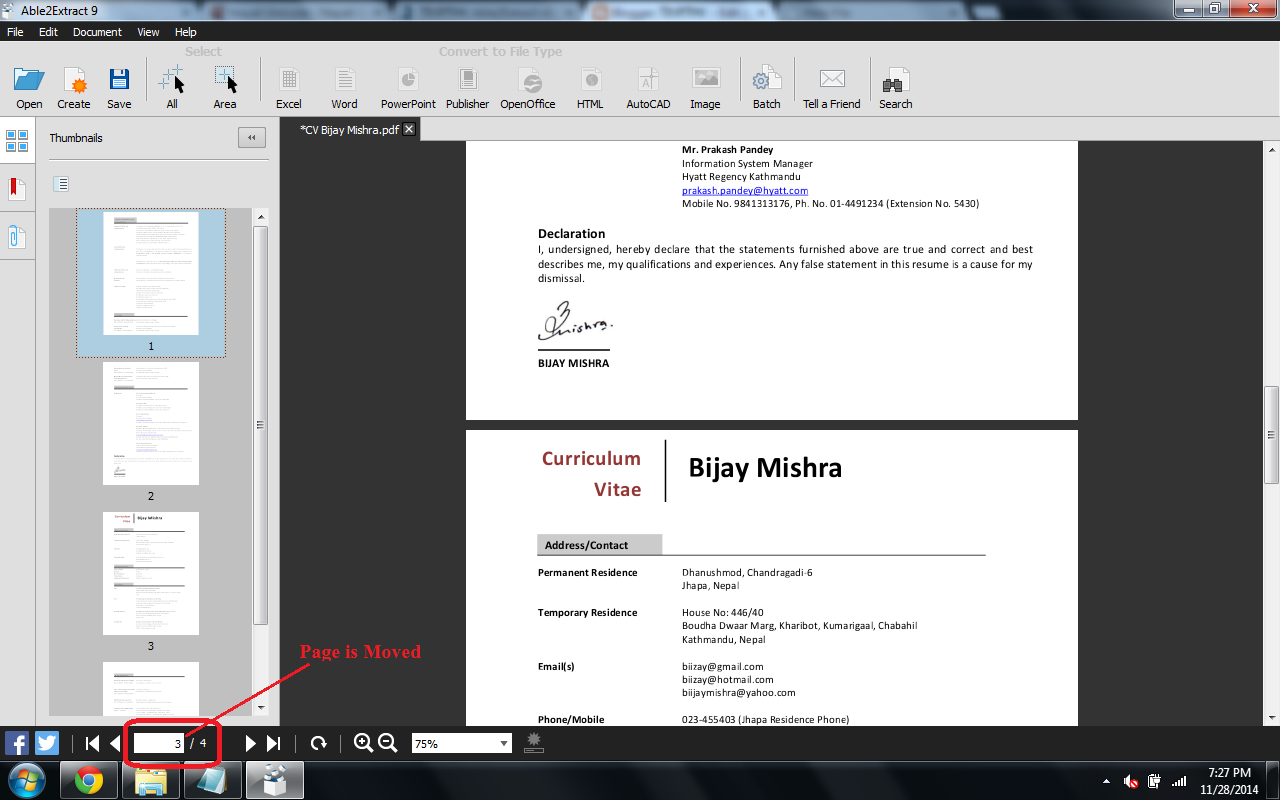
Result of "Move Pages" 

"Rotate Pages" Option

Result of "Rotate Pages"

"Scale Pages" Option

Result of "Scale Pages"

Viewer Preferences
It helps to specify how your PDF document will be displayed when opened by recipients with a standard PDF viewing application.

Example 1: Page Mode with Thumbnail Panel. This creates the PDF file with the thumbnails in the left Panel as shown in the image below:


"Page Mode" with "Thumbnail Panel" Option

"Thumbnailed" PDF File

Example 2: Page Layout with Two columns, First Page on Left. This creates the PDF file with the thumbnails in the left Panel as shown in the image below:


"Page Layout" with "Two Columns, First Page on Left" Option 

Result of  "Two Columns, First Page on Left"

PDF Creation Option
The Security tab allows users to specify the level of security for the PDF files being created. Checking the Secure PDF box will give users options to apply a User or Owner password. Applying an Owner password enables users to add file permissions that can either restrict or allow users to print, copy content, modify the document and add comments.

Security Tab

Compatible Operating Systems:
Able2Extract 9 is released today i.e. December 3, 2014 and is one of the application’s most significant upgrades to date. This is a cross-platform compatible version that runs on both Mac and Linux operating systems in addition to Windows.
  1. Windows 8.1, Windows 8, Windows 7, Windows Vista, XP SP3/2003 SP3/Vista SP2/7/2008/8 or newer, x32 or x64 edition
  2. Mac OS X 10.5.8 (Leopard)/10.6.1 (Snow Leopard)/10.7 (Lion)/10.8 (Mountain Lion) or newer, x32 or x64 editions
  3. Fedora 15 or newer, Ubuntu 10.04, 11.04 or newer, x32 or x64 editions


I have given my try .... You guys can also have a try by downloading from the link given below. 

Download Able2Extract 9 from Here

Test the Application with a Free Trial 

Able2Extract can be downloaded for seven-day free trial from the Investintech Website. The software is available for professional and personal use. In addition to a 7 day free trial, Able2Extract is also available for single, volume, and subscription licensing. (I have my subscribed licensed version. You too can purchase it.).


A licensed Version

Buy it. You would not regret in your decision for purchasing it.

Source: http://www.investintech.com/ 

The author of this Blog can be interacted on Twitter. You can follow him at this Handle

Add To Google BookmarksStumble ThisFav This With TechnoratiAdd To Del.icio.usDigg ThisAdd To RedditTwit ThisAdd To FacebookAdd To Yahoo

Sunday, September 28, 2014

eCalc : An Online Scientific Calculator for your Convenience

Everybody needs a calculator at some point. You can use your physical calculator whenever it is with you. But what about the "miss" when you are in a need. You better go for the internet and see some useful and handy "Online Calculator". But are all the tools useful. May be or may be not. But the tool I am talking about is always available when you need it. It's eCalc.


eCalc is a free and easy to use scientific calculator that supports many advanced features including unit conversion, equation solving, and even complex-number math.  eCalc is offered as both a free online calculator and as a downloadable calculator. Especially engineering students would love to use this online calculator which has better functions than the windows default calculator.

It has basic functions like: 
Addition, Subtraction, Multiplication, Division, Sign, Square, Square Root, Raise to the Power, Natural Exponential, Logarithm, Natural Logarithm, Inverse, Exponent, Factorial, PI, etc. 

It has Online Trigonometric Functions like: 
Sine, Inverse Sine, Cosine, Inverse Cosine, Tangent, Inverse Tangent, Cosecant, Inverse Cosecant, Secant, Inverse Secant, Cotangent, Inverse Cotangent, etc.

It has Online Hyperbolic Trigonometric Functions like: 
Hyperbolic Sine, Inverse Hyperbolic Sine, Hyperbolic Cosine, Inverse Hyperbolic Cosine, Hyperbolic Tangent, Inverse Hyperbolic Tangent, Hyperbolic Cosecant, Inverse Hyperbolic Cosecant, Hyperbolic Secant, Inverse Hyperbolic Secant, Hyperbolic Cotangent, Inverse Hyperbolic Cotangent, etc.

It also have some advanced features like support for complex numbers, unit conversion, base conversion, and has a built in equation solver.

Download link for eCalc Scientific Calculator (Windows Version) is Here
Download link for eCalc Scientific Calculator (Mac OSX Version) is Here

Source: http://www.eeweb.com

Add To Google BookmarksStumble ThisFav This With TechnoratiAdd To Del.icio.usDigg ThisAdd To RedditTwit ThisAdd To FacebookAdd To Yahoo

Saturday, August 30, 2014

दुई कथा

आज तपाइँहरु को समक्ष्य दुईवटा कथाहरु लिएर आएको छु! यी कथाहरुको कथाकार हुनुहुन्छ "सदिक्ष्या मिश्र", कथालाई वहाले http://midreel.com/ मा पोस्ट गर्नु भएको छ |


पहिलो कथा : Heart and the anatomy of how to break it
For a short while, Deeva almost believed she could be Superwoman. She was flying high, and he was her red cape. All that an eleven year old girl ever wants in life is that she has her mother to teach her all kinds of ways to do her hair for school, and her father to tell him of her tales from school in the evening. Such was her life, when she was eleven. But then, all a father wants in life is a bottle of whiskey in the morning to wake up and a bottle of vodka in the evening to sleep. Well, at least hers did.

Daddy was a word used with caution. She wouldn’t know what version of daddy she might get every morning. One day he was a normal daddy, shaving his beard in the mirror, making jokes with her every now and then. And the next day daddy was barely able to walk a straight line, cursing everyone he saw and everything he fell over. Mommy knew Deeva shouldn’t have to see this, but what could she do? A home without a father is barely a home.

With all that happened around the house, Deeva still loved her father very much. He was the proud King of Deeva’s wonderland, and she, a princess of poise and everything beautiful. He would smile at her, sometimes with affection, and sometimes with bloodshot, liquored and hazy eyes. Nevertheless, she cherished his smiles, his strong arms that lifted her up to the ceiling, his beautiful, beautiful name that Deeva herself had anointed – Daddy.

She could see that mommy would always look solemn every time daddy returned home with that god awful smell all over him. She could hear them fight almost every night in the other room, when they thought she’d gone to sleep. She understood that daddy had a bad habit, and mommy hated it, but she also loved her daddy and she knew that someone she truly loved could not be wrong.

On a rainy Wednesday night, mommy was busy looking out the window, waiting for father to come home. Deeva was watching TV; mommy was too occupied to tell her to go study. It must have been almost eleven when finally mommy ran downstairs to open the doors for him, and Deeva cheerfully waited till they both returned upstairs. Mommy came upstairs soon, with a bitter look on her face. So it is the drunken daddy tonight, Deeva thought. Daddy wobbled himself to the room, placed himself to the nearest sofa from the door and mumbled something incoherent.

 Mommy paid no attention and swiftly went to the kitchen to ready the dinner for daddy. He stared at the ceiling for a while, and mumbled something again, this time a little louder. Mommy made no effort to acknowledge him. Deeva, getting a little worried, peered into the kitchen. Mommy was curled up in a chair, her face buried in her shawl. Daddy mumbled something once more, and struggled around the sofa. Drunken as was the man, he had no clue of the direction he was moving to, and fell head first to the ground. A startled Deeva ran to her father’s rescue and helped him sit up.

The next thing she knew was a swift thunder and when her eyes opened she was on the floor, with a throbbing pain on her right cheek. Mommy was stood on her side, with a strange look in her eyes Deeva hadn’t seen before. When realisation dawned upon Deeva that the painful thunder was none but a father’s crude thank you to a daughter across her baby face, she broke into a loud cry. Mommy picked her up promptly and took her to the next room. Deeva wasn’t aware of much of what happened next, but in almost twenty minutes, mommy was dragging a big suitcase in her hands and with the other she held Deeva. Daddy was unconscious, lying on the same floor that she’d tried to help him off of. He looked nothing like a King but more of a pauper, sad and sorry. Mommy took the suitcase and her daughter and made her way out into the night, leaving the safety of a home with a daddy, and it seemed to Deeva that they wouldn’t be coming back soon.

She stole a look at mommy with her tear stricken face and saw that the night had failed to hide from her face a flicker of sadness, a little hint of fear and a whole lot of relief. Deeva knew not what they were heading to, but she no longer thought well of the bottles that daddy brought home.

Source: http://midreel.com/heart-and-the-anatomy-of-how-to-break-it/


दोस्रो कथा : Windows are the sores to my eyes
I’ve heard lots of praise about windows – being subjected to all the glory with that one saying with eyes being window to the soul and whatnot. Well, no. I don’t buy it. Windows are evil. Windows are hateful things and I loathe them, especially the fifty five windows that surround the fifty feet of my home. It’s so dark tonight, yet I can see through each one of them, making me the prying spy into my neighbours’ lives. If I look closely enough, I can see that old man on the fourth floor of that gigantic house right opposite my window smoking his Surya. And if his wife isn’t too careful with her bathroom window, I might just see her do some unmentionable activities. Sigh. These windows show me everything, everything except the one thing that I actually want to see tonight – stars.

Even in this load shedding laden night, I look out into the outlines of my neighbours’ windows and feel somehow violated. Sure, it’s me looking at them, but a piece of my privacy is lost into this as well. The more I ponder about the vicinity of my windows and theirs, the more I feel suffocated; it’s like they’re closing in on me slowly, slamming onwards, imprinting visions on my mind that I’d much rather forget. No, I don’t want to see Mrs. Shrestha pour milk on her lemon tea, and I don’t want to count the eight holes on Mr. Khaniya’s blue underwear. I just want to shut all my windows tight. But I can’t do that because then I’d literally suffocate.

Sometimes I wonder why my parents bothered with getting windows in our house. There are times when I am just being myself, prancing around my room that I dread drawing the curtains and finding a pair of judging eyes paying guest to my personal cirque du soleil. I’m scared of changing in my room on windy days because I know that pervert on the second floor right opposite my house is just lurking there on his window, waiting to catch a glimpse.

I find it funny that with all the things we are so careful of, we just can’t be a little wary of our windows. For instance there’s this girl right next to my house who is extremely careful about dimming her lights and locking her door before she gets on the phone with her boyfriend. Yet when she is all oohey-gooey romantically staring at the stars from her window saying, “I love you too Jaanu”, her mother is listening to her conversations from the next window.

You see, my neighbourhood is the worst kept secret, where everyone is closed off, but their secrets are open. And I feel like the world’s biggest hypocrite, hating windows and walls and yet I’m the civil engineer who’s building their walls so people have a fake sense of privacy. I’m the engineer who’s building their windows so their privacy is public’s business.

Source: http://midreel.com/windows-sores-eyes/

कथाकारको पेज: http://midreel.com/author/axidasmdr/


Add To Google BookmarksStumble ThisFav This With TechnoratiAdd To Del.icio.usDigg ThisAdd To RedditTwit ThisAdd To FacebookAdd To Yahoo

Thursday, July 31, 2014

Syncing, Importing, and Organizing your Android Phone Contacts with Google Account


We are very much close friend with our GOOGLE isn't so? Then why not try to use more of it services along with our next best buddy ANDROID phones. Have you any idea that we can sync, import and organize all our android phone contacts with the Google account? 

You can manage your Google contacts from within your Google account. This will save you from trying around on your mobile phone's keyboard to try to arrange, categorize, create, edit, and delete those contacts.

If you want the non-Google contacts that are already on your Android phone to be migrated to Google contacts, there is no way to do this directly on the phone; instead, you have to do an export/import. You have to export the contacts to a CSV file to your SD card and then import that file into Google.

The contacts on any Android phone can be created in three groups – SIM contact, Phone Contact and Google Account contact. If the new contacts are created in either of Phone or SIM, that cannot be synchronized with the Google account. For the contacts to be synced with the Google account, we need to create the contacts to save to Google account associated with the phone.

Steps:

(1) From the home screen, tap Contacts.
Note: If the shortcut is no longer on the home screen, tap Apps and tap Contacts.

(2) Tap the Menu key.

(3) Tap Import/Export.

 (4) Tap Export to SD Card

(5) Select OK to confirm


The contacts are now exported to a vCard (i.e. vcf) file in the SD card. 

Once this is done, import the same vcf file back, but import should be done under your Google account.

(6) Open Contacts > Menu > Import / Export > Import from SD Card > Choose your Google account (with gmail.com)

Note: When importing contacts, if prompted, tap to select the desired account the contacts are to be imported into. Now, this has created all the contacts in your Google account on your phone, next step is to sync the same on actual Google account online. Make sure you are connected to internet. 

(7) Go to Settings > Accounts and Sync > Manage accounts, click on your Google account (displayed with your gmail id) > Make sure Contacts is checked > Open Menu > Sync now.

Source: google.com 

Hey! My friends, If you like my post you can save it using "Save Page as PDF" button below and you can even share them to your friends with social networking buttons provided below this post.

Add To Google BookmarksStumble ThisFav This With TechnoratiAdd To Del.icio.usDigg ThisAdd To RedditTwit ThisAdd To FacebookAdd To Yahoo